
You know the routine. You’re writing a message, you need a short link, so you open a new tab, navigate to your shortener, paste the URL, click shorten, copy the result, switch back, and paste. Six steps and two tab switches for something that should take one click.
If you do this five times a day, that’s thirty context switches. Not a catastrophe, but a constant low-grade friction that breaks your flow every single time.
I built the gofwd.to Chrome Extension to kill that friction. Click the icon, get a short link, keep moving.
What It Does
The extension sits in your browser toolbar and does three things:
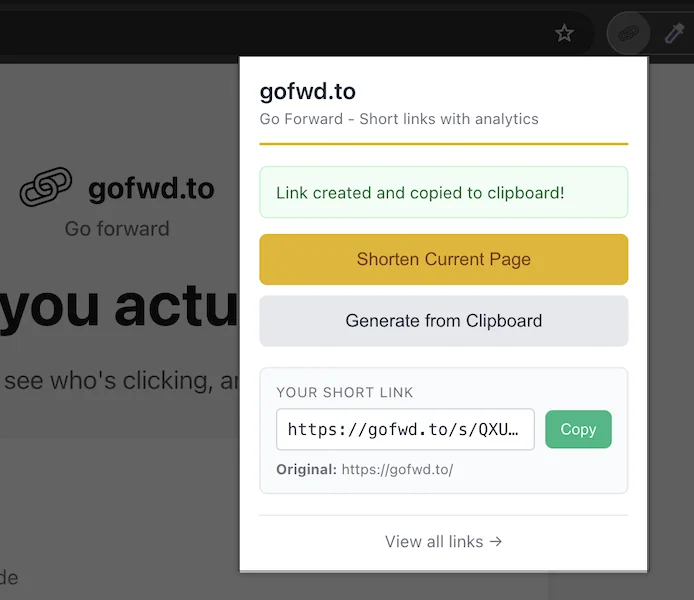
Shorten the current page. Click the icon, hit “Shorten Current Page,” and you get a tracked gofwd.to link for whatever tab you’re on. The link is automatically copied to your clipboard.
Shorten from clipboard. Already have a URL copied? Hit “Generate from Clipboard” and it creates a short link from whatever’s in your clipboard. Useful when someone sends you a long URL in Slack and you want to clean it up before sharing it elsewhere.
Auto-copy. Every time you create a short link, it lands in your clipboard immediately. No extra step. Just Cmd+V (or Ctrl+V) wherever you need it.
That’s it. No dashboard, no settings page, no feature bloat. You click, you get a link, you move on.
How to Install
Two steps, maybe ninety seconds:
1. Install the extension
Grab it from the Chrome Web Store . Click “Add to Chrome.” Done.
2. Sign in to gofwd.to
Open app.gofwd.to and sign in (or create an account if you don’t have one). The extension uses your existing session—once you’re signed in to the web app, the extension picks up your authentication automatically. No API keys, no tokens to copy around.
That’s the entire setup. Pin the extension to your toolbar for easy access and you’re ready.
Day-to-Day Workflow
Here’s how I actually use this thing:
Sharing on social. I’m reading an article I want to post on X or LinkedIn. I click the extension, get a short link with tracking, and paste it into my post. Now I know exactly how many people clicked through, without switching tabs or breaking my train of thought.
Dropping links in Slack and docs. Long URLs in Slack messages look awful and break formatting. A quick gofwd.to link keeps things clean, and I get click data as a bonus. Same goes for Google Docs, Notion, emails—anywhere a short link beats a three-line URL.
Quick sharing in meetings. Someone asks for a link during a call. Instead of fumbling with a URL shortener in another tab, I just click the extension on the page I want to share, paste the link in chat. Takes two seconds.
Tracking outbound links. Every link you create through the extension shows up in your gofwd.to dashboard with full click analytics. You can see how many clicks, where they came from, and when. No extra setup required—it’s all automatic.
Questions You Probably Have
Do I need a gofwd.to account?
Yes. The extension authenticates through your gofwd.to session. Sign up is free and takes about thirty seconds.
Is the extension free?
Yes. No extra cost, no premium tier. If you have a gofwd.to account, you can use the extension.
What permissions does it need?
Four permissions, all justified:
- cookies — reads your gofwd.to auth token so you don’t have to sign in separately
- activeTab — reads the URL of your current tab when you click “Shorten Current Page”
- clipboardRead — reads your clipboard for the “Generate from Clipboard” feature
- clipboardWrite — copies the short link to your clipboard automatically
No browsing history, no access to page content, no background tracking. The extension only activates when you click it.
Does it work on Firefox/Safari/Edge?
Chrome only for now. Edge might work since it supports Chrome extensions, but I haven’t tested it.
Where do my links live?
In your gofwd.to account. You can view, edit, and delete them from app.gofwd.to/links just like any other link you create.
Get It
Install the gofwd.to Chrome Extension from the Chrome Web Store. Setup takes under two minutes. Every link you create gets automatic click tracking.
Stop tab-switching. Start shortening.